

A TFT motorcycle dash is a full-color, high-brightness digital instrument that replaces analog gauges and puts navigation, vehicle data, and connectivity on a single readable screen. Built on Thin-Film Transistor technology, it delivers sharper contrast, faster refresh, and far more customization than an old LCD readout. It’s worth the upgrade if you want TPMS alerts, riding mode selection, or phone connectivity without adding a phone mount to your handlebars.
TL;DR:
- Compatibility depends on supporting your bike’s specific CAN bus protocol, fitment, and calibration requirements, rather than just matching screen size or features.
- OEM TFT dashboards offer the best integration and OTA firmware updates, but they tend to be more expensive and limited to supported models.
- Plug-and-play aftermarket units balance ease of installation and customization, with TPMS and navigation features commonly available on higher-quality options.
- Universal displays are flexible and less costly upfront but require more wiring, calibration, and configuration, making them less straightforward for most riders.
Table of Contents
- What Makes a TFT Motorcycle Dash Different From Older Gauges
- Which Specs Actually Matter When Buying a TFT Dash
- OEM, Plug-and-Play, or Universal: Which TFT Type Fits Your Bike
- Comparing the Top TFT Dash Options Worth Considering
- How to Check Compatibility Before You Buy or Install
- Why Dirty Birdy Powersports Is a Trusted Resource for This Upgrade
- How Firmware Updates and Support Work on TFT Dashboards
- What Riders Get Wrong About Upgrading to a TFT Dash
- Get Help Sourcing Mounts, Harnesses, and Installation Support
- Sources
What Makes a TFT Motorcycle Dash Different From Older Gauges
Thin-Film Transistor technology gives each pixel its own transistor, which means the screen can push more colors, refresh faster, and stay legible from odd viewing angles compared to the passive-matrix LCDs found on older bikes. That’s why a TFT screen looks closer to a smartphone display than the gray, low-contrast readout on a ten-year-old sportbike.
Most modern units run 5 to 7 inches diagonally, sized to fit a motorcycle cockpit without blocking sightlines. Brightness varies widely by tier, and that range matters more than screen size for real-world usability.
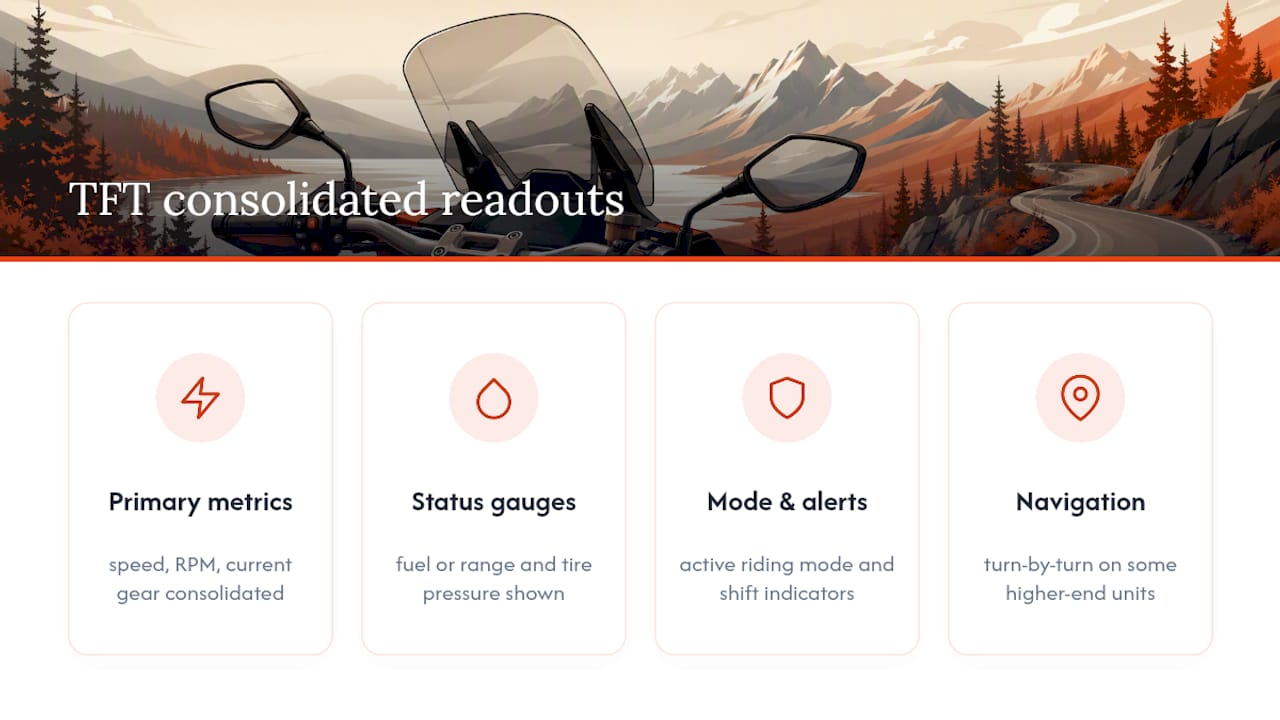
A single TFT panel typically consolidates speed, RPM, current gear, fuel or range, tire pressure, and active riding mode onto one layout, with some higher-end units adding turn-by-turn navigation and shift indicators. Instead of hunting across three separate gauges for a warning light, everything shows up in one glance, which is the main reason riders switch. The tradeoff is that you’re now trusting one component to do the job of several, so quality and support matter more than they did with simple analog gauges.
Which Specs Actually Matter When Buying a TFT Dash
Not every TFT dash spec sheet tells you what you actually need to know on the road. Some numbers are marketing filler. Others determine whether you can read your speed at noon on a highway.
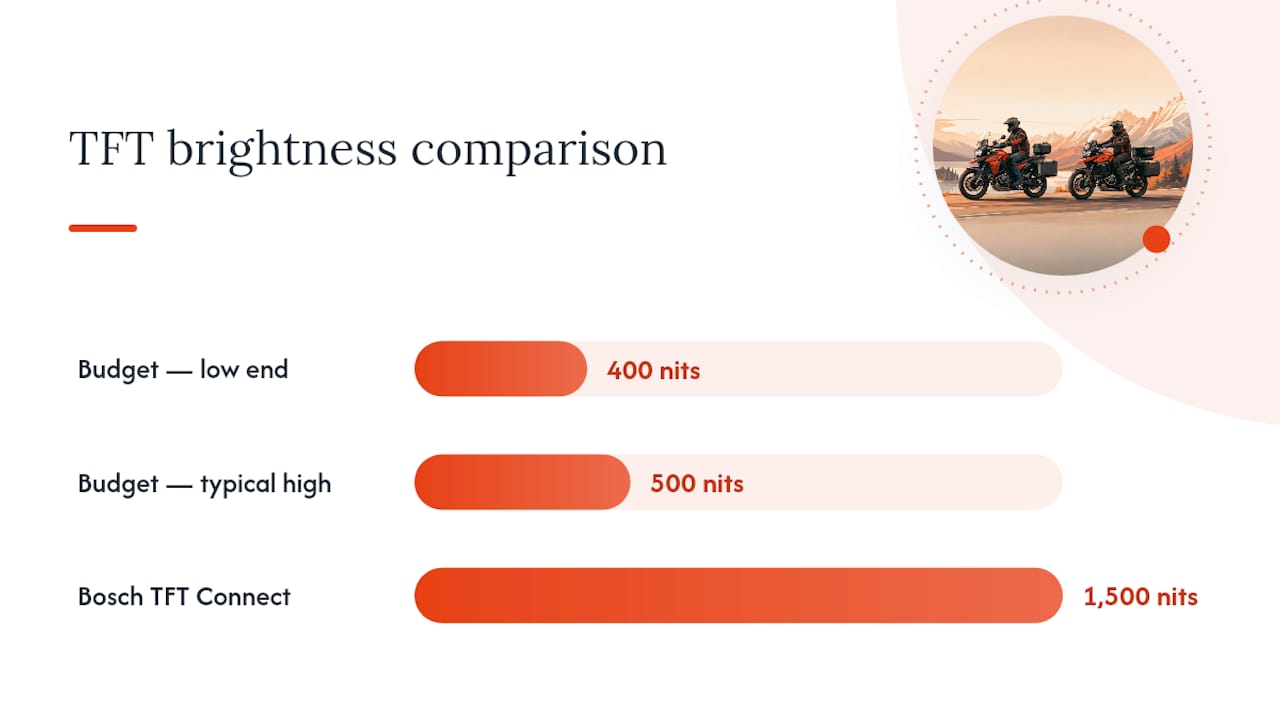
- Brightness (nits): This is the single biggest predictor of daylight readability. Budget units sit around 400 to 500 nits and wash out in direct sun.
- Contrast and color depth: Higher contrast ratios (Bosch’s platform cites 1,250:1) keep numbers crisp instead of muddy against a bright background.
- Screen size and resolution: A bigger panel isn’t always better if your cockpit is tight. Match the physical footprint to your bike before chasing inches.
- Touch vs. physical buttons: Touchscreens are intuitive but often unusable with winter gloves. Look for glove-touch capacitive screens or a dedicated button/joystick fallback.
- IP rating and vibration tolerance: A dash exposed to rain, road salt, and constant vibration needs a real ingress rating, not just a “water-resistant” label.
- Connectivity: Bluetooth 5.x, dual-band Wi-Fi, and wireless CarPlay/Android Auto increasingly separate premium units from budget ones.
- Extras: TPMS integration, camera inputs, data logging, and OTA firmware updates add long-term value beyond the initial install.
Statistic to know: Bosch’s premium TFT Connect platform advertises brightness up to 1,500 nits, more than triple what a budget aftermarket screen typically offers, which explains why some displays stay readable at high noon while others practically disappear.
Pro Tip: Test any dash you’re considering under direct sunlight before buying, not in a dim showroom. A screen that looks great indoors can become unreadable the moment you’re riding into an afternoon glare.
OEM, Plug-and-Play, or Universal: Which TFT Type Fits Your Bike
TFT solutions fall into three categories, and picking the wrong one wastes money and installation time.
- OEM dashboards come built into newer motorcycles or as manufacturer-supported upgrades. They integrate deeply with the bike’s electronics, so gear position, ABS status, and riding modes all display natively. Fitment is usually straightforward within the same model family, but you’re locked into what the manufacturer supports, and pricing runs highest.
- Plug-and-play aftermarket kits replace an existing analog or basic digital cluster with a vehicle-specific TFT unit designed for that exact model. These preserve most factory signals like TPMS and speed data while requiring minimal wiring changes. The TFT Dash Project built its whole approach around this category, offering direct swaps with speed calibration and two-button control.
- Universal smart displays mount almost anywhere and work across many bikes, but they often need adapters, a separate GPS antenna, or a harness tap to pull in real vehicle data. They’re the most flexible option and typically the least expensive to start, though installation complexity climbs if you want deep integration.
Budget roughly scales with integration depth: universal units start cheapest, plug-and-play kits sit in the middle, and OEM-grade platforms command the highest prices for the tightest fit.
Comparing the Top TFT Dash Options Worth Considering
Four products represent the range of what’s available right now, from factory-grade platforms to bolt-on smart displays.
| Product | Screen Size | Brightness | Connectivity | Fitment | Built-In Extras |
|---|---|---|---|---|---|
| Bosch TFT Connect | Varies by OEM install | High brightness | Bluetooth 5.2, wireless CarPlay, dual-band Wi-Fi | OEM/plug-and-play (manufacturer install) | OTA updates, embedded navigation |
| TFT Dash Project | Vehicle-specific | Not publicly listed | Basic (no CarPlay/Bluetooth advertised) | Plug-and-play (vehicle-specific) | TPMS compatibility, speed calibration |
| NextRide M7 | 7" IPS | ~800-nit class | Bluetooth, optional connectivity features | Universal | TPMS, optional front/rear cameras |
| KOSO HD-03X | Model-specific gauge set | Not publicly listed | Smartphone app | Plug-and-play (supported Harley baggers) | TPMS, shift light, multiple color modes |
Bosch TFT Connect is the platform manufacturers license for factory-grade displays, and it shows in the spec sheet: brightness up to 1,500 nits, 16.7 million colors, and wireless CarPlay baked in. This is the benchmark for riders who want a screen that stays legible at highway speed in direct sun, though you’ll typically encounter it through an OEM install rather than a standalone retail purchase.
TFT Dash Project takes the opposite approach: keep it simple and vehicle-specific. Its plug-and-play kits target owners who want a modern look on a classic bike without rewiring the whole electrical system, with TPMS compatibility and speed calibration built in.
NextRide M7 fills the universal-display niche. Its 7-inch IPS glove-touch screen, optional front and rear cameras, and TPMS support make it a strong pick for adventure and touring riders who want camera coverage and navigation without buying an OEM-locked system.
KOSO HD-03X narrows in on a specific use case: supported Harley-Davidson bagger models get a direct gauge replacement with rich smartphone app customization, multiple color themes, and a shift light, appealing to riders who care as much about style as function.
How to Check Compatibility Before You Buy or Install
The spec sheet only tells half the story. Compatibility is where most TFT installs go wrong.
- Confirm the dash supports your bike’s CAN or CAN-FD bus protocol. If it doesn’t, functions like gear detection and ABS messaging may not display correctly.
- Ask whether the fit is genuinely plug-and-play for your exact model year, or whether you’ll need a harness adapter and extra wiring.
- Check if the unit needs a speedo healer or calibration step, especially if you’ve changed final drive gearing or sprocket sizing.
- Ask the seller directly about the supported vehicle list, whether firmware updates are OTA or manual, and their return policy if fitment fails.
- If you wear polarized sunglasses, ask about anti-polarization coatings. Some TFT panels blackout or darken significantly under polarized lenses.
Pro Tip: Before ordering anything, pull your bike’s exact model year and trim level and cross-reference it against the vendor’s compatibility list rather than trusting a general “fits most models” claim. A single wiring pin difference between model years can make an otherwise perfect kit incompatible.
Why Dirty Birdy Powersports Is a Trusted Resource for This Upgrade
Dirty Birdy Powersports is a CFMOTO dealership that has completed over 200 deliveries with a 5.0 Google rating, backed by a team that actually rides the machines it sells. Beyond vehicle sales, the shop stocks mounting hardware, including Polaris Ranger tablet dash mounts, for riders installing universal displays. Ask the team for a compatibility check or installation quote before you buy.
How Firmware Updates and Support Work on TFT Dashboards
Firmware determines whether your dash keeps improving after purchase or stays frozen at whatever it shipped with. OEM-grade platforms like Bosch’s TFT Connect push over-the-air (OTA) updates directly to the display, similar to a phone update, adding features or fixing bugs without a shop visit. This is one of the clearer advantages of buying into a manufacturer-backed platform instead of a no-name universal screen.
Plug-and-play and smaller aftermarket units handle this differently. Some require connecting the dash to a computer via USB and running a manufacturer-supplied update tool. Others update through a companion smartphone app, which is how KOSO’s HD-03X handles customization and, in many cases, firmware refreshes.
Before buying any TFT dash, ask two questions: how are updates delivered, and how long has the manufacturer supported previous models? A vendor with a multi-year track record of pushing updates to older units is a better bet than one that stopped supporting last year’s model the moment a new one launched. Support quality also shows up in documentation. Vendors like the TFT Dash Project and KOSO publish specific fitment and feature notes rather than vague marketing copy, which is a decent proxy for how seriously they’ll handle post-purchase support if something goes wrong.
If you’re buying a universal display, also confirm whether navigation works offline. Many smart displays still lean on a paired phone for full mapping, though newer systems are adding native processors and offline map storage to cut that dependency.
What Riders Get Wrong About Upgrading to a TFT Dash
Most buying guides treat brightness and screen size as the whole decision. They’re not. The bigger failure point is compatibility, specifically whether a dash actually reads your bike’s CAN bus messages correctly instead of just powering on and displaying generic numbers.
I’d also push back on the assumption that universal displays are automatically the “smart” budget choice. They’re flexible, yes, but flexibility means you’re doing integration work a plug-and-play kit or OEM system does for you. If your bike has a supported plug-and-play option like those from the TFT Dash Project or KOSO, that’s usually the less frustrating path, even if the sticker price is higher than a generic universal unit.
The other overlooked factor is glove-touch usability. A gorgeous touchscreen that goes dead the moment you put on winter gloves is a real problem, not a minor inconvenience. Prioritize confirmed compatibility and real-world touch response before chasing the highest nit count on the spec sheet. Everything else is secondary once those two boxes are checked.
— Dirty
Get Help Sourcing Mounts, Harnesses, and Installation Support
Dirty Birdy Powersports gets you to a working, correctly calibrated TFT setup faster than piecing it together yourself, because you’re working with riders who’ve handled these installs, not a call center reading from a script.
Whether you’re mounting a universal smart display, running a new dash harness for a plug-and-play kit, or just need someone to check your bike’s CAN bus compatibility before you order anything, the team can walk you through it. Dirty Birdy Powersports sells at MSRP with no markups and backs every sale with over 200 completed deliveries and a 5.0 Google rating, so you’re not guessing whether the parts you’re buying will actually fit. If your dash upgrade involves related upgrades to tires, mirrors, or other accessories while you’re at it, browse the full accessories catalog and reach out for a compatibility check or installation quote before you commit to a purchase.